SiteLens Reports · Browser Intelligence
Evidence-first reporting for real browser QA.
SiteLens combines browser automation, observability, diagnostics, visual regression, and evidence into one coherent workflow. SiteLens Reports turns that evidence model into structured, portable reports for developers, QA teams, AI agents, and stakeholders — without uploading your run to SiteLens.
The local viewer runs in your browser. Choose a report.json or portable .zip —
report contents are never uploaded.
Evidence-first reporting
Run the browser workflow, capture the evidence, and turn it into a portable report. Report generation does not rerun Playwright — it packages what the run already produced.
Same canonical model
One SiteLensReportV1 across CLI, MCP, Dashboard, and Desktop — not four report schemas.
Inspect locally
Open reports on your device. Dashboard and Desktop keep evidence on-machine unless you choose otherwise.
Agent-ready bounds
MCP tools return summaries, failures, and selected sections — not unbounded dumps by default.
What a report can contain
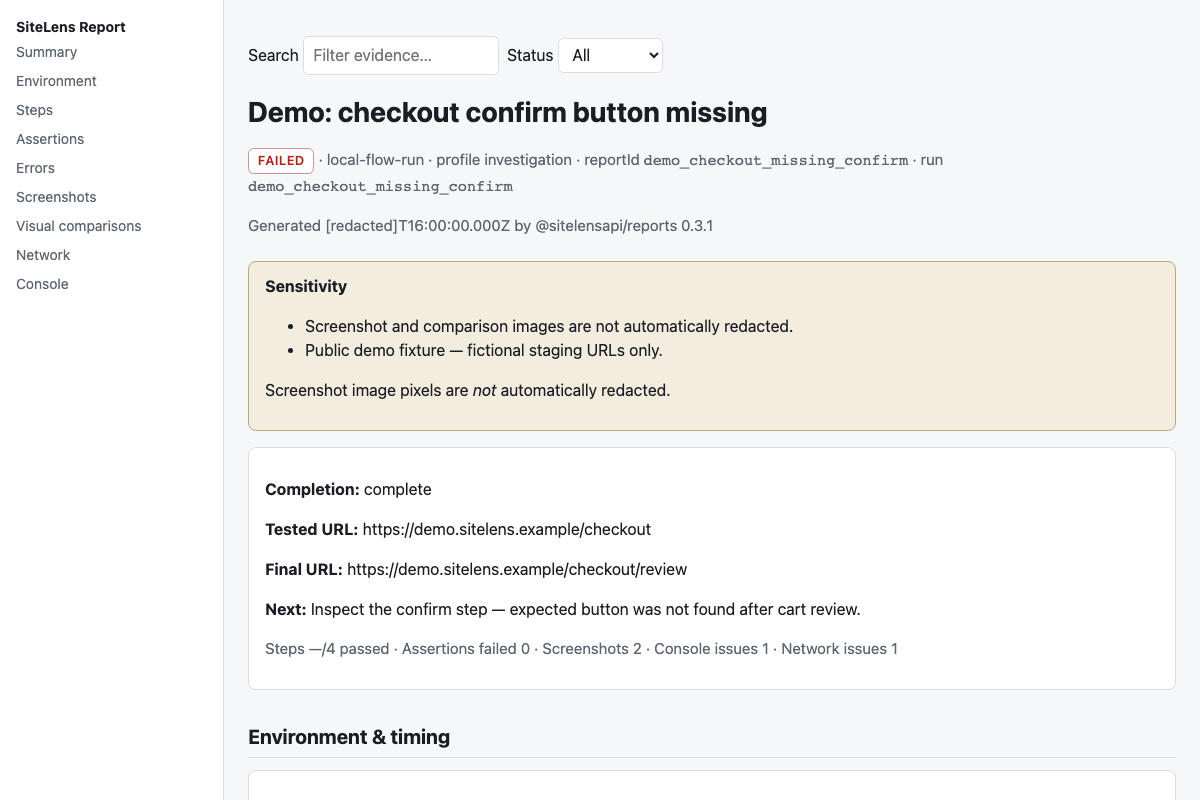
- Status, completion, run / scenario / flow identity, timing
- Steps, assertions, execution errors
- Screenshots and visual comparisons from existing evidence
- Network and console evidence
- Environment metadata and child-report references for suites
- Sensitivity warnings (including that image pixels are not auto-redacted)
Output formats
report.json
Canonical structured report — always written on artifact-exporting runs.
Markdown
Readable investigation report for humans and git-friendly artifacts.
Offline HTML
Self-contained CSS — generated on request. Open from the bundle folder or after portable export.
Portable ZIP
Directory or ZIP with manifest, assets, and SHA-256 integrity checks.
PDF report
Chromium prints an existing report.html to report.pdf on your machine. This is the QA report, not a PDF of the page you tested.
PDF reports from a finished local run
After a local QA run has evidence, generate the report and export a PDF. The export does not launch the scenario again, and Cloud capture does not turn a public webpage into a PDF.
sitelens report generate --from ./runs/<id> --format json,html
sitelens report render --from ./runs/<id> --format html,pdf
sitelens report pdf --from ./runs/<id>/report.html
From MCP, call sitelens_report_generate, then sitelens_report_export_pdf.
Both ship in the published @sitelensapi/mcp package and run locally.
CLI workflow
sitelens report generate --from ./runs/<id> --format json,html
sitelens report validate --from ./runs/<id>
sitelens report export --from ./runs/<id> --out ./report.zip
sitelens report show --from ./runs/<id> --section failures
Ships with @sitelensapi/mcp. See the engineering CLI reference in the docs.
MCP and AI agents
Tools: sitelens_report_list, sitelens_report_get,
sitelens_report_failures, sitelens_report_read,
sitelens_report_validate, sitelens_report_generate,
sitelens_report_export_pdf.
- Locate or generate a report under trusted roots
- Get a compact summary
- Retrieve failures
- Read one bounded section
- Open screenshot or comparison references locally
Dashboard local viewer
Open
app.sitelensapi.com/tools/reports
— no account required. Drag in report.json or a portable ZIP. Validation and rendering stay in your browser.
Desktop
SiteLens Desktop prefers canonical report.json in run artifact folders, falls back to
report.md for older runs, and can open portable ZIPs in-app.
Download Desktop
Portability and integrity
Portable bundles include manifest.json with content hashes. Validate before you share a ZIP offline.
Integrity checks do not prove evidence is safe to disclose publicly.
Privacy and redaction
- Textual report evidence is passed through reporting redaction
- Screenshot and comparison images are not automatically redacted
- Local Dashboard viewer does not upload report contents
- Hosted report storage and share links are not part of this launch